

Terrestrial
Overview
Section titled “Overview”Create Earth-like worlds with distinct continents, water, clouds and night-side cities.
Shader menu · FORGE3D/Planets HD/Terrestrial
Visual example
Section titled “Visual example”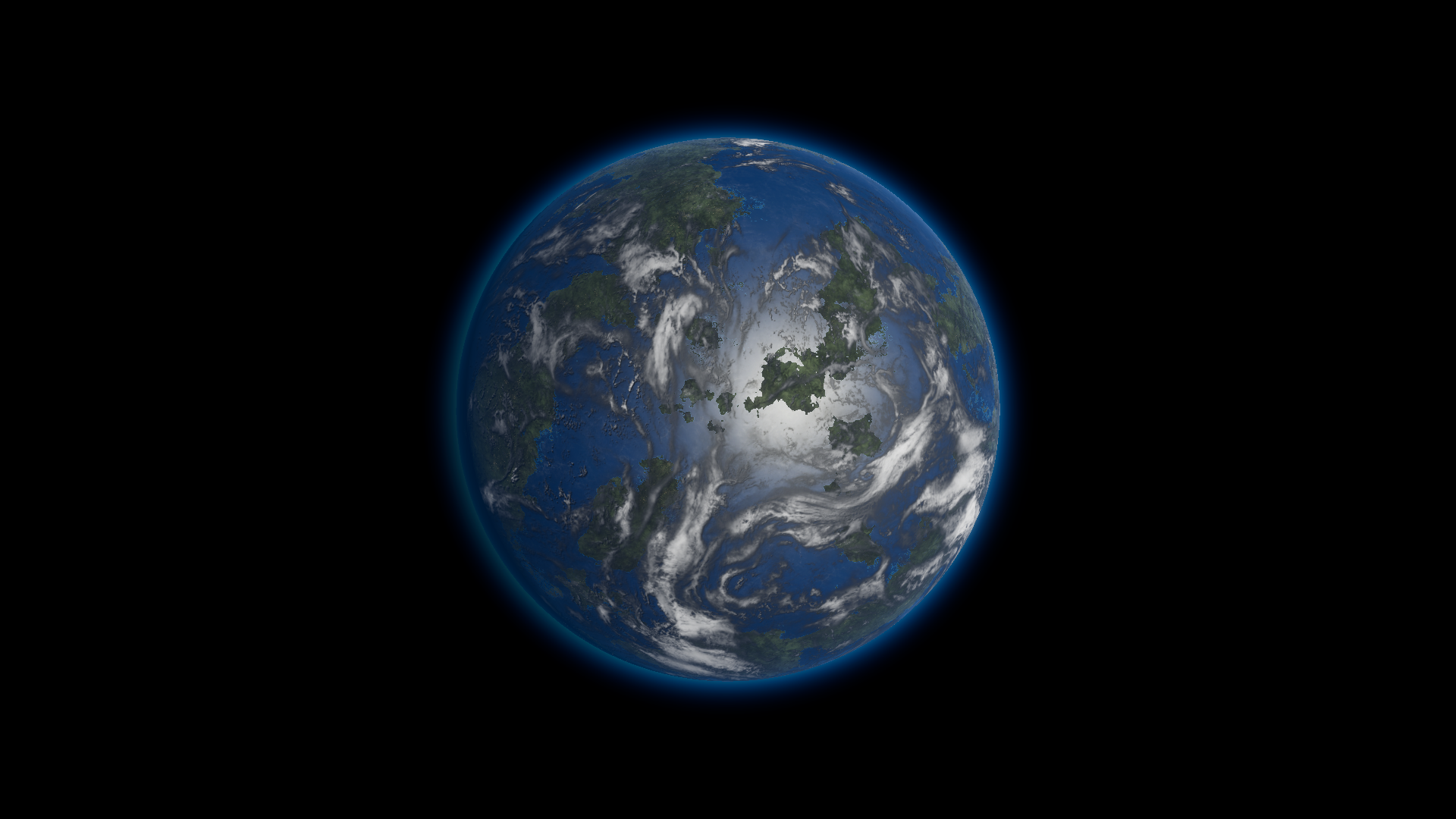
Before · Clouds Output 1 on the Terrestrial 01 body.
Where to find it
Section titled “Where to find it”Paths are relative to Assets/FORGE3D/Planets HDRP.
Select the root Mesh Renderer on Prefabs/Planet_Terrestrial_01.prefab. It uses Terrestrial/Materials/Planet_Terrestrial_01.mat. The matching atmosphere is a separate material.
Main settings
Section titled “Main settings”| Group | Inspector setting and property ID | What it changes |
|---|---|---|
| Surface | Land Mask _LandMask, WaterShore Step _WaterShoreStep | Select land from R and shape the shore blend from G. Keep the original thresholds as a baseline. |
| Color | Vegetation Color _VegetationColor, Desert Color _DesertColor, Mountain Color _MountainColor | Set the terrain palette in the corresponding masked regions. |
| Water | Water Deep Color _WaterDeepColor, Water Shallow Color _WaterShallowColor, Water Shore Color _WaterShoreColor | Set ocean and coastal colors. |
| Lighting | Land Specular _LandSpecular, Land Smoothness _LandSmoothness, Water Specular _WaterSpecular, Water Smoothness _WaterSmoothness | Adjust the highlights on land and water separately. |
| Clouds | Clouds Top _CloudsTop, Clouds Middle _CloudsMiddle, Clouds Tint _CloudsTint, Clouds Output _CloudsOutput | Supply and tint the two cloud patterns and set visible cloud contribution. |
Advanced settings
Section titled “Advanced settings”| Group | Inspector setting and property ID | What it changes |
|---|---|---|
| Clouds | Cloud Shadows _CloudShadows, Cloud Occlusion _CloudOcclusion, Clouds Height _CloudsHeight | Adjust ground darkening, highlight suppression and shadow offset. |
| Animation | Clouds Top Speed _CloudsTopSpeed, Clouds Middle Speed _CloudsMiddleSpeed | Pan the two layers independently over time. |
| Emission maps | City Light Map _CityLightMap, CityLight UV Map _CityLightUVMap, CityLight Mask Map _CityLightMaskMap | Supply the city detail, UV layout and placement mask. Keep the supplied maps together when starting a variant. |
| Emission | CityLight Color _CityLightColor, CityLight Population _CityLightPopulation | Tint the night-side emission and shape the density of visible clusters. Keep Population positive and retain the city maps. |
| Surface | Normal Scale _NormalScale, Normal Fresnel Scale _NormalFresnelScale | Tune surface relief and the normal contribution to the grazing-angle color. |
Practical example
Section titled “Practical example”For a clearer view of the continents, set Clouds Output to 0 on a copy and compare with the original 1. Keep Cloud Shadows fixed so you can judge the cloud color alone.
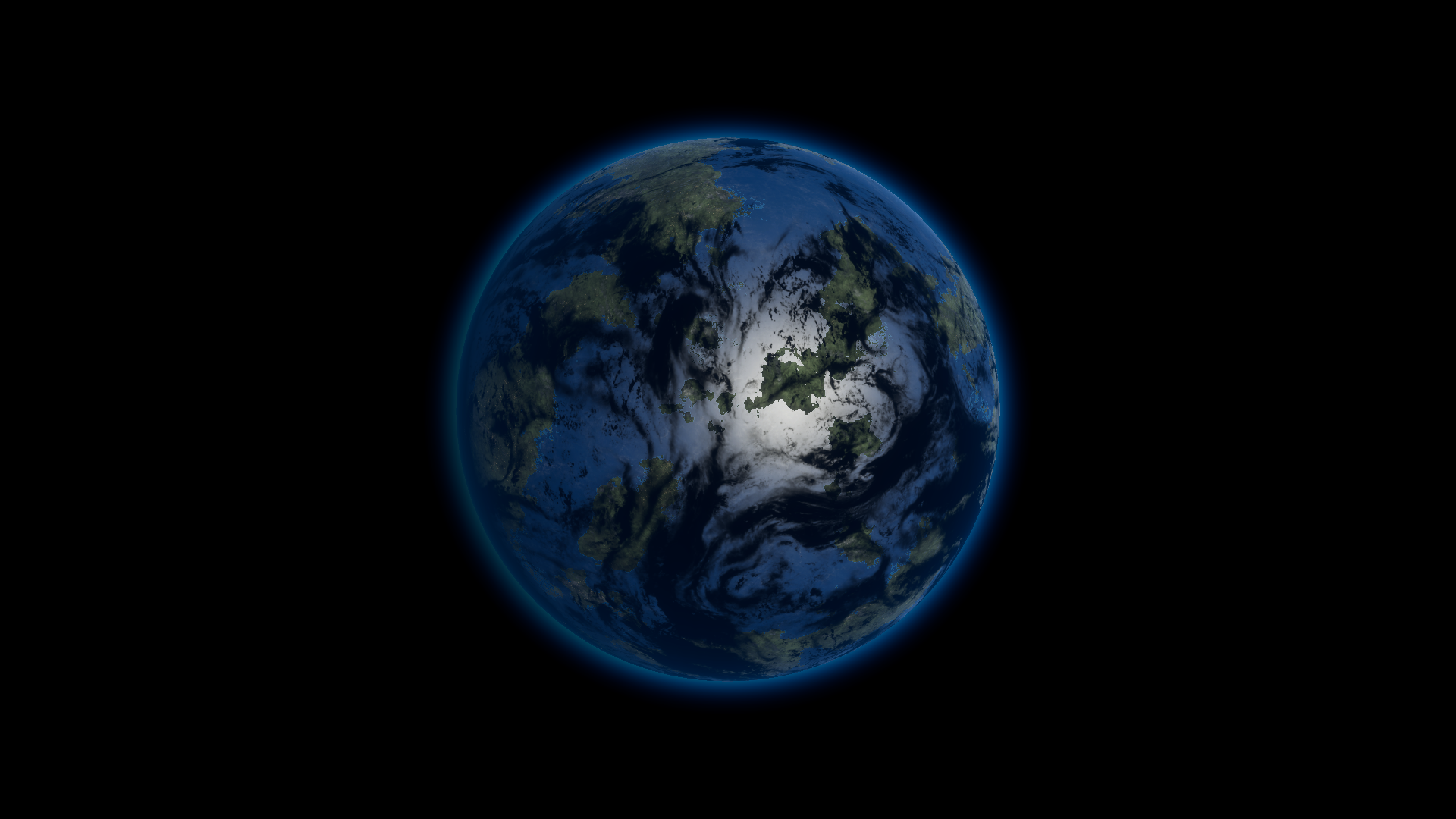
After · Clouds Output 0. Ground-shadow settings are unchanged.